Community project
Tiny ESP DeskBuddy Dashboard
Эльдар Алиев
Published July 16, 2026 · Updated July 16, 2026
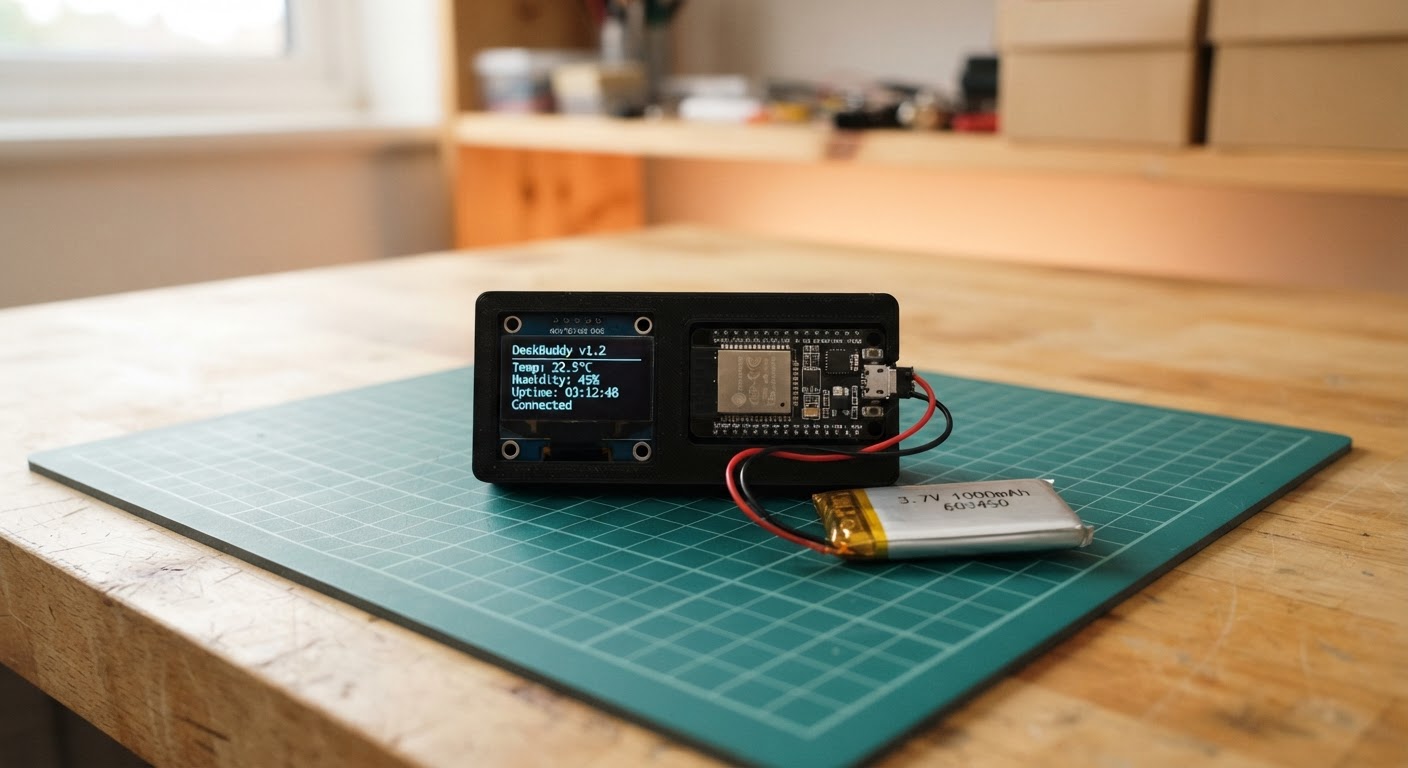
The Tiny ESP DeskBuddy Dashboard is a compact, battery-powered display device that brings personality to your desk. Built around an ESP32 microcontroller with an integrated touchscreen display and powered by a LiPo battery, this project combines a cute animated face interface with practical information widgets including weather, time, moon phases, and email notifications.
This guide provides everything needed to assemble and configure the DeskBuddy: a complete wiring diagram showing connections for the display, touch input, and IMU sensor; a full parts list; Arduino firmware with Wi-Fi connectivity for fetching live data; and step-by-step assembly instructions covering battery integration, safe enclosure design, and initial setup. Makers will learn how to work with GFX libraries, handle touch input, and create a multi-page dashboard interface on a resource-constrained embedded system.
Wiring diagram
Interactive · read-onlyPan and zoom to explore the wiring. Remix the project to edit it in your own workspace.
Parts list
Bill of materials| Component | Qty | Notes |
|---|---|---|
| LiPo 3.7V 1000mAh Battery3.7 V 1000 mAh | 1 | Single-cell LiPo pack, nominal 3.7 V, 1000 mAh. Default rechargeable choice for portable ESP32 / Pico projects. Pair with a TP4056 charger for safe USB recharging. |
Assembly
5 stepsUse the board’s built-in display hardware
No external OLED or IMU is required: the LCD, touch controller, and motion sensor are already fitted to the Waveshare ESP32-C6-Touch-LCD-1.47 board.
- Tip: Do not connect anything to the LCD or touch GPIOs; they are internally wired on the board.
- ⚠ Avoid pressing or flexing the LCD ribbon area.
Connect the LiPo battery
With USB disconnected, plug lipo-1 into the board’s matching single-cell LiPo/JST battery connector, observing the connector key and polarity.
- Tip: A 1000 mAh protected 3.7 V LiPo gives roughly 4–5 hours depending on screen brightness and Wi-Fi use.
- ⚠ Use only a single-cell 3.7 V LiPo. Never force a connector, reverse polarity, puncture, bend, or use a swollen battery.
Plan safe enclosure clearances
Mount the board on standoffs in the printed enclosure with a clear window for the screen and an accessible USB-C port. Add a separate, snug battery pocket that cannot pinch the battery wires.
- Tip: Use nonconductive standoffs or nylon screws and leave a small cable loop at the battery connector.
- ⚠ Do not trap the LiPo under the PCB, place screws against it, or seal it where heat cannot escape during charging.
Set up Wi-Fi settings
Edit include/secrets.h in this project with your Wi-Fi name/password, location coordinates, GitHub username, and optional Finnhub token for a live AAPL quote.
- Tip: Leaving the Finnhub token blank keeps the project functional and shows AAPL as N/A.
- ⚠ Keep secrets.h private; do not share Wi-Fi credentials or API tokens.
Power and test
Use Schematik’s Deploy button to flash the firmware. Tap the screen to cycle face moods; swipe horizontally to reach clock, weather, and status pages. Tilt the device to move the eyes.
- Tip: The first network update may take a few moments after Wi-Fi connects.
- ⚠ Supervise charging and use a suitable USB power source. Stop using the battery if it becomes hot, damaged, or swollen.
Pin assignments
Board wiring reference| Pin | Connection | Type |
|---|---|---|
| EXT | lipo-1 +V → Waveshare ESP32-C6-Touch-LCD-1.47 BAT+ battery connector | power |
| EXT | lipo-1 GND → Waveshare ESP32-C6-Touch-LCD-1.47 BAT- battery connector | ground |
Firmware
ESP32#include <Arduino.h>
#include <Wire.h>
#include <WiFi.h>
#include <HTTPClient.h>
#include <ArduinoJson.h>
#include <time.h>
#include <Arduino_GFX_Library.h>
#include "secrets.h"
#define TFT_SCK 1
#define TFT_MOSI 2
#define TFT_CS 14
#define TFT_DC 15
#define TOUCH_SDA 18
#define TOUCH_SCL 19
#define TOUCH_RST 20
#define TOUCH_INT 21
#define TFT_RST 22
#define TFT_BL 23
#define TOUCH_ADDR 0x3B
#define IMU_ADDR 0x6B
enum Page { FACE, CLOCK_PAGE, WEATHER_PAGE, INFO_PAGE };
// Forward declarations
uint8_t readReg(uint8_t address,uint8_t reg);
void initImu();
void updateEyes();
String moonPhase();
void fetchNetwork();
void text(const String&s,int x,int y,uint16_t color,uint8_t size);
void drawFace();
void drawPage();
void readTouch();
void writeReg(uint8_t address, uint8_t reg, uint8_t value); uint8_t readReg(uint8_t address, uint8_t reg); void initImu(); void updateEyes(); String moonPhase(); void fetchNetwork(); void text(const String &s, int x, int y, uint16_t color, uint8_t size); void drawFace(); void drawPage(); void readTouch();
Arduino_DataBus *bus = new Arduino_ESP32SPI(TFT_DC, TFT_CS, TFT_SCK, TFT_MOSI, GFX_NOT_DEFINED);
Arduino_GFX *gfx = new Arduino_JD9853(bus, TFT_RST, 0, true, 172, 320, 0, 0, 0, 0);
Page page = FACE; String mood = "calm"; float temperatureC = NAN; float usdRub = NAN; float weatherLat = NAN, weatherLon = NAN; String weatherPlace = "Locating..."; int unreadMail = -1; int previousUnreadMail = -1; uint32_t lastNetwork = 0, mailAlertUntil = 0; int eyeX = 0, eyeY = 0;
void writeReg(uint8_t address,uint8_t reg,uint8_t value){Wire.beginTransmission(address);Wire.write(reg);Wire.write(value);Wire.endTransmission();}
uint8_t readReg(uint8_t address,uint8_t reg){Wire.beginTransmission(address);Wire.write(reg);Wire.endTransmission(false);Wire.requestFrom((int)address,1);return Wire.available()?Wire.read():0;}
void initImu(){writeReg(IMU_ADDR,0x02,0x60);writeReg(IMU_ADDR,0x03,0x23);}
void updateEyes(){Wire.beginTransmission(IMU_ADDR);Wire.write(0x35);Wire.endTransmission(false);if(Wire.requestFrom(IMU_ADDR,4)==4){int16_t ax=Wire.read()|(Wire.read()<<8),ay=Wire.read()|(Wire.read()<<8);eyeX=constrain(ax/1800,-5,5);eyeY=constrain(-ay/1800,-4,4);}}
String moonPhase(){time_t now=time(nullptr);if(now<100000)return "--";const double synodic=29.53058867;double days=difftime(now,947182440)/86400.0;int phase=(int)(fmod(days,synodic)/synodic*8+0.5)&7;const char *names[]={"New","Waxing crescent","First quarter","Waxing gibbous","Full","Waning gibbous","Last quarter","Waning crescent"};return names[phase];}
void fetchNetwork(){if(WiFi.status()!=WL_CONNECTED)return;HTTPClient http;DynamicJsonDocument doc(3072);if(isnan(weatherLat)||isnan(weatherLon)){http.begin("https://ipapi.co/json/");if(http.GET()==200&&!deserializeJson(doc,http.getString())){weatherLat=doc["latitude"]|NAN;weatherLon=doc["longitude"]|NAN;weatherPlace=doc["city"]|"Nearby";}http.end();}if(!isnan(weatherLat)&&!isnan(weatherLon)&&String(YANDEX_WEATHER_API_KEY).length()>8){doc.clear();String weatherUrl="https://api.weather.yandex.ru/v2/forecast?lat="+String(weatherLat,4)+"&lon="+String(weatherLon,4)+"&limit=1&hours=false&extra=false";http.begin(weatherUrl);http.addHeader("X-Yandex-Weather-Key",YANDEX_WEATHER_API_KEY);if(http.GET()==200&&!deserializeJson(doc,http.getString()))temperatureC=doc["fact"]["temp"]|NAN;http.end();}http.begin("https://open.er-api.com/v6/latest/USD");if(http.GET()==200&&!deserializeJson(doc,http.getString()))usdRub=doc["rates"]["RUB"]|NAN;http.end();if(String(GMAIL_WEBHOOK_URL).length()>8){doc.clear();http.begin(GMAIL_WEBHOOK_URL);if(http.GET()==200&&!deserializeJson(doc,http.getString())){int receivedUnread=doc["unread"]| -1;if(receivedUnread>=0){if(previousUnreadMail>=0&&receivedUnread>previousUnreadMail){mood="mail";mailAlertUntil=millis()+60000;}unreadMail=receivedUnread;previousUnreadMail=receivedUnread;}}http.end();}}
void text(const String&s,int x,int y,uint16_t color,uint8_t size=1){gfx->setTextColor(color);gfx->setTextSize(size);gfx->setCursor(x,y);gfx->print(s);}
void drawFace(){gfx->fillScreen(BLACK);gfx->fillRoundRect(12,20,148,210,22,0x39E7);gfx->fillCircle(57+eyeX,102+eyeY,18,BLACK);gfx->fillCircle(115+eyeX,102+eyeY,18,BLACK);if(mood=="happy")gfx->drawArc(86,145,28,18,15,165,WHITE);else if(mood=="sleepy"){gfx->drawFastHLine(39,102,36,WHITE);gfx->drawFastHLine(97,102,36,WHITE);text("z",132,64,WHITE,2);}else if(mood=="surprised")gfx->drawCircle(86,148,13,BLACK);else if(mood=="mail"){text("MAIL!",48,138,BLACK,2);gfx->drawRect(60,158,52,30,BLACK);gfx->drawLine(60,158,86,178,BLACK);gfx->drawLine(112,158,86,178,BLACK);}else gfx->drawFastHLine(68,150,36,BLACK);text("DESKBUDDY",30,247,CYAN,2);if(mood=="mail")text("New Gmail received",24,280,WHITE,1);else text("tap: mood swipe: pages",16,280,LIGHTGREY,1);}
void drawPage(){gfx->fillScreen(BLACK);struct tm t;getLocalTime(&t,50);if(page==CLOCK_PAGE){char b[32];strftime(b,sizeof(b),"%H:%M",&t);text(b,18,60,WHITE,5);strftime(b,sizeof(b),"%a, %d %b %Y",&t);text(b,18,140,CYAN,2);text("Moon: "+moonPhase(),18,200,LIGHTGREY,2);}else if(page==WEATHER_PAGE){text("WEATHER",18,26,CYAN,2);text(isnan(temperatureC)?"Connecting...":String(temperatureC,1)+" C",18,75,WHITE,4);text("Yandex: "+weatherPlace,18,145,LIGHTGREY,2);text("Moon: "+moonPhase(),18,190,LIGHTGREY,2);}else{text("STATUS",18,26,CYAN,2);text("USD/RUB: "+(isnan(usdRub)?String("N/A"):String(usdRub,2)),18,80,WHITE,2);text("1 USD in Russian rubles",18,105,LIGHTGREY,1);text("Mail unread: "+(unreadMail<0?String("N/A"):String(unreadMail)),18,145,LIGHTGREY,2);text("Wi-Fi: "+String(WiFi.status()==WL_CONNECTED?"online":"offline"),18,175,LIGHTGREY,2);}text("Swipe left/right",18,285,LIGHTGREY,1);}
void readTouch(){Wire.beginTransmission(TOUCH_ADDR);Wire.write(0x00);Wire.endTransmission(false);if(Wire.requestFrom(TOUCH_ADDR,7)<7)return;uint8_t count=Wire.read();uint16_t x=(Wire.read()<<8)|Wire.read();uint16_t y=(Wire.read()<<8)|Wire.read();Wire.read();Wire.read();static bool down=false;static uint16_t startX=0;if(count&&!down){down=true;startX=x;}if(!count&&down){down=false;int delta=(int)x-startX;if(abs(delta)>45)page=(Page)((page+(delta<0?1:3))%4);else if(page==FACE)mood=mood=="calm"?"happy":mood=="happy"?"sleepy":mood=="sleepy"?"surprised":"calm";}}
void setup(){pinMode(TFT_BL,OUTPUT);digitalWrite(TFT_BL,HIGH);gfx->begin();gfx->fillScreen(BLACK);Wire.begin(TOUCH_SDA,TOUCH_SCL);pinMode(TOUCH_RST,OUTPUT);digitalWrite(TOUCH_RST,LOW);delay(10);digitalWrite(TOUCH_RST,HIGH);initImu();WiFi.begin(WIFI_SSID,WIFI_PASSWORD);configTime(0,0,"pool.ntp.org","time.nist.gov");}
void loop(){readTouch();updateEyes();if(mood=="mail"&&mailAlertUntil&&millis()>mailAlertUntil)mood="calm";if(millis()-lastNetwork>300000||!lastNetwork){lastNetwork=millis();fetchNetwork();}if(page==FACE)drawFace();else drawPage();delay(45);}“Deploy to device” opens this project in Schematik, where you can flash it to your board over USB.
Remix this project
Make it yours in one click
Open a full copy of this project in your own Schematik workspace — diagram, code, parts, and assembly steps included. Swap the sensor, add features, or redesign the whole thing with AI. The author's original stays untouched.