Community project
Orquidea AI - 1.0v - Smart Humidity Controller
Hugo Oliveira
Published July 15, 2026 · Updated July 16, 2026
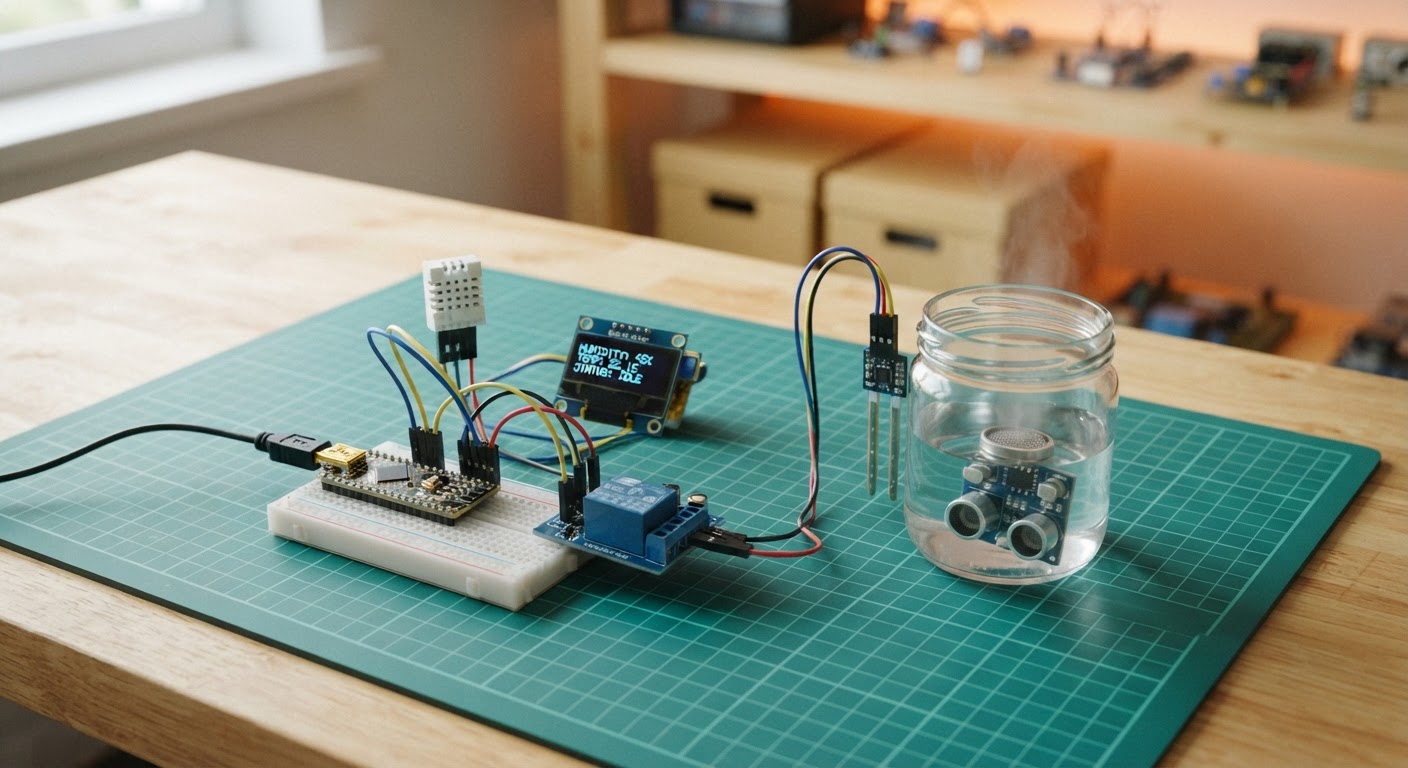
Orquidea AI is a smart humidity controller designed to keep orchids and other plants thriving by automatically monitoring and maintaining optimal moisture levels. Built around an ESP32 microcontroller, it combines a DHT22 temperature and humidity sensor, a relay-controlled ultrasonic mist maker, and a water level sensor to create an intelligent watering system that can be monitored and controlled both locally via OLED display and remotely through a web dashboard.
This guide provides everything needed to assemble and deploy the system: a complete wiring diagram showing how to connect the DHT22, relay module, mist maker, water level sensor, and OLED display to the ESP32; a full parts list; ready-to-use firmware with local web server and 7-day historical logging stored on the ESP32; and step-by-step assembly instructions from breadboard setup through final deployment and verification.
Wiring diagram
Interactive · read-only
Pan and zoom to explore the wiring. Remix the project to edit it in your own workspace.
Parts list
Bill of materials| Component | Qty | Notes |
|---|---|---|
| DHT22 | 1 | Digital temperature and humidity sensor |
| 1-Channel 5V Relay Module (3.3V trigger compatible) | 1 | Single-channel 5V relay module with optocoupler isolation. Most common Chinese relay modules (SRD-05VDC-SL-C) trigger reliably from 3.3V GPIO when the IN pin is active-LOW — the optocoupler LED forward voltage is ~1.2V so 3.3V is sufficient. VCC is 5V (coil), GND and IN come from the ESP32. COM/NO are the switched relay contacts for the mist maker 5V line. |
| Ultrasonic Mist Maker Module (5V) | 1 | 5V USB ultrasonic piezoelectric mist maker disc with driver board. Power-switched via relay for on/off control. Do not drive the disc directly from GPIO. Must be submerged in water during operation. |
| Water Level Sensor | 1 | An analog water level sensor module that outputs a voltage proportional to the water level. It uses ten interleaved copper traces and an S8050 NPN transistor to convert water conductivity into an analog voltage signal. The higher the water level, the higher the output voltage. Operates on 3.3V to 5V. To extend sensor lifespan, it is recommended to power the sensor only during readings by controlling the VCC pin via a digital output pin rather than connecting it permanently to 5V. |
| SSD1306 OLED | 1 | 0.96 inch 128x64 OLED display with I2C interface |
Assembly
8 stepsMateriais necessários
Separa todos os componentes: ESP32 DevKit v1, DHT22, módulo relé 5V, módulo de névoa ultrassónico 5V (com placa USB), sensor de nível de água, OLED SSD1306 0.96", breadboard, fios jumper, cabo USB para o ESP32, carregador USB separado para o módulo de névoa.
- Tip: Usa uma breadboard grande — tens 5 componentes para ligar.
- Tip: Prepara fios de cores diferentes: vermelho=5V, laranja=3.3V, preto=GND, outras cores para sinais.
Coloca o ESP32 na breadboard
Encaixa o ESP32 DevKit v1 ao centro da breadboard, com cada fila de pinos num lado diferente. Deixa espaço suficiente em redor para os fios.
- Tip: O ESP32 DevKit ocupa quase toda a largura de uma breadboard de 30 colunas — usa uma de 60 colunas se tiveres.
Liga o OLED SSD1306
Liga o display OLED SSD1306 ao ESP32 pelos pinos I2C: • VCC → 3.3V do ESP32 • GND → GND do ESP32 • SDA → GPIO21 • SCL → GPIO22 O display fica imediatamente funcional — ao ligar o ESP32 deves ver o ecrã de arranque.
- Tip: Muitos módulos OLED têm a ordem VCC/GND trocada — verifica a serigrafia da tua placa antes de ligar.
- Tip: O OLED funciona a 3.3V — não ligues ao 5V ou queimas o ecrã.
- ⚠ Verifica sempre a ordem dos pinos no teu módulo OLED específico — não é universal.
Liga o DHT22
Liga o sensor DHT22: • VCC → 3.3V do ESP32 • GND → GND do ESP32 • DATA → GPIO4 Se o teu DHT22 vier como módulo (3 pinos), tem resistência de pull-up integrada. Se vier como sensor simples (4 pinos), adiciona uma resistência de 10kΩ entre VCC e DATA.
- Tip: Coloca o DHT22 longe do módulo de névoa — pelo menos 30 cm. A névoa satura o sensor e dará sempre 100%.
Liga o módulo relé
Liga o módulo relé 5V: • VCC do relé → 5V (VIN) do ESP32 • GND do relé → GND do ESP32 • IN do relé → GPIO26 Nos terminais de potência do relé: • COM → fio vermelho (VCC) cortado do cabo USB do módulo de névoa • NO → fio vermelho que vai para o módulo de névoa
- Tip: Usa um cabo USB barato para cortar — não estragues um cabo de qualidade.
- Tip: O fio preto (GND) do cabo USB vai direto ao carregador, sem passar pelo relé.
- ⚠ Verifica que os fios cortados estão bem isolados com fita isolante ou termoretrátil antes de ligar à corrente.
Liga o sensor de nível de água
Liga o sensor de nível de água: • + (VCC) → GPIO27 (alimentado só durante leitura) • - (GND) → GND do ESP32 • S (SIG) → GPIO32 Positiona o sensor verticalmente dentro do reservatório, com os pentes de cobre submersos.
- Tip: Submerge apenas a parte dos pentes — a parte eletrónica (componentes) não deve entrar em contacto com água.
- Tip: Usa silicone ou cola quente para fixar o sensor à parede do reservatório na posição vertical.
- ⚠ Nunca submerjas a placa de controlo do sensor — só os pentes condutores.
Monta o reservatório e módulo de névoa
Coloca o módulo de névoa ultrassónico num recipiente não metálico (plástico ou cerâmica) com água. O disco piezoelétrico deve ficar submerso entre 3 a 5 cm abaixo da superfície da água. Liga o cabo USB do módulo ao carregador USB externo (separado do ESP32).
- Tip: Usa água destilada ou filtrada para evitar depósitos de calcário no disco.
- Tip: O reservatório deve ter pelo menos 1 litro para uma autonomia razoável.
- ⚠ Nunca ligues o módulo de névoa sem água — o disco funde em segundos a seco.
- ⚠ Mantém toda a eletrónica (ESP32, relé, OLED) longe de salpicos de água.
Verificação final e Deploy
Antes de ligar: 1. Verifica todas as ligações contra a tabela de pinos 2. Confirma que os fios cortados do USB estão bem isolados 3. Liga o ESP32 via USB ao computador 4. Substitui as credenciais Wi-Fi e Blynk no firmware 5. Faz Deploy pelo botão Schematik 6. Abre o Monitor Série — deves ver as leituras a cada 5 segundos 7. Calibra o sensor de nível: anota o valor com sensor a seco (RAW_EMPTY) e submerso (RAW_FULL), atualiza o firmware e faz novo Deploy
- Tip: O display OLED deve acender com o ecrã de arranque logo ao ligar — é uma boa confirmação de que o I2C está correto.
- Tip: Se o OLED não aparecer, verifica se o endereço I2C é 0x3C ou 0x3D (alguns módulos usam 0x3D) — edita OLED_ADDRESS no código.
- ⚠ Só liga o carregador USB do módulo de névoa depois de confirmar que o firmware está a correr e o relé responde aos comandos.
Pin assignments
Board wiring reference| Pin | Connection | Type |
|---|---|---|
| 3V3 | dht22_1 VCC | power |
| GND | dht22_1 GND | ground |
| GPIO 4 | dht22_1 DATA | data |
| 5V | relay_1 VCC | power |
| GND | relay_1 GND | ground |
| GPIO 26 | relay_1 IN | digital |
| EXT | relay_1 COM → USB 5V power supply + | digital |
| EXT | relay_1 NO → Ultrasonic Mist Maker Module (5V) VCC | digital |
| EXT | mist_1 GND → USB 5V power supply GND | ground |
| GPIO 32 | water_level_1 S | analog |
| GPIO 27 | water_level_1 + | digital |
| GND | water_level_1 - | ground |
| 3V3 | oled_1 VCC | power |
| GND | oled_1 GND | ground |
| GPIO 21 | oled_1 SDA | i2c |
| GPIO 22 | oled_1 SCL | i2c |
Firmware
ESP32#include <Arduino.h>
// ============================================================
// Orquidea IA v1.0 — Servidor Web Local + LittleFS
// Humidificador Inteligente com Dashboard Web + OLED
// Histórico persistente de 7 dias em flash (LittleFS)
// ============================================================
// ACESSO:
// 1. Abre o Monitor Série — o IP aparece no arranque
// 2. Abre esse IP no browser do telemóvel ou PC
// 3. Via VPN: acede ao mesmo IP da rede de casa
//
// CONFIGURAÇÃO:
// Substitui WIFI_SSID e WIFI_PASS abaixo com os teus dados.
// ============================================================
// ── Credenciais Wi-Fi ────────────────────────────────────────
#define WIFI_SSID "O_Teu_WiFi" // ← substitui
#define WIFI_PASS "A_Tua_Password" // ← substitui
#include <WiFi.h>
#include <ESPAsyncWebServer.h>
#include <AsyncTCP.h>
#include <ArduinoJson.h>
#include <DHT.h>
#include <Wire.h>
#include <Adafruit_GFX.h>
#include <Adafruit_SSD1306.h>
#include <LittleFS.h>
#include <time.h>
// ── Pinos ────────────────────────────────────────────────────
#define DHT_PIN 4
#define RELAY_PIN 26
#define WATER_SIG_PIN 32
#define WATER_PWR_PIN 27
#define OLED_SDA 21
#define OLED_SCL 22
// ── OLED ─────────────────────────────────────────────────────
#define SCREEN_WIDTH 128
#define SCREEN_HEIGHT 64
#define OLED_RESET -1
#define OLED_ADDRESS 0x3C
// ── Histórico ─────────────────────────────────────────────────
// 1 ponto a cada 10 minutos = 144 pontos/dia × 7 dias = 1008 pontos
#define HISTORY_DAYS 7
#define HISTORY_INTERVAL_MS 600000UL // 10 minutos em ms
#define DATA_DIR "/data"
// ── Sensor de água ────────────────────────────────────────────
// Forward declarations
// Forward declarations
function downloadDay();
function downloadAll();
void mistOn();
void mistOff();
void updateTimeStrings();
float readWaterLevel();
void saveHistoryPoint(float t, float h);
String listAvailableDays();
String readDayHistory(const String& day);
void pruneOldFiles();
void broadcastState();
void onWsEvent(AsyncWebSocket *srv, AsyncWebSocketClient *client, AwsEventType type, void *arg, uint8_t *data, size_t len);
void readAndControl();
void showBootScreen();
void updateDisplay();
function showTab(name);
function initCharts(labels, temps, hums);
function loadAvailableDays();
function loadSelectedDay();
function connect();
function send(obj);
function toggleMist();
function sendTempMin(v);
function sendTempMax(v);
function sendHumMin(v);
function sendHumMax(v);
const int RAW_EMPTY = 0;
const int RAW_FULL = 3200;
const float WATER_LOW_THRESHOLD = 20.0f;
const float WATER_CRIT = 10.0f;
Adafruit_SSD1306 display(SCREEN_WIDTH, SCREEN_HEIGHT, &Wire, OLED_RESET);
#define DHTTYPE DHT22
DHT dht(DHT_PIN, DHTTYPE);
// ── NTP ──────────────────────────────────────────────────────
#define NTP_SERVER "pool.ntp.org"
#define TZ_PORTUGAL "WET0WEST,M3.5.0/1,M10.5.0"
char timeStr[9] = "--:--:--";
char dateStr[11] = "--/--/----";
char dateKey[11] = ""; // "YYYY-MM-DD" — chave do ficheiro de hoje
// ── Servidor ─────────────────────────────────────────────────
AsyncWebServer server(80);
AsyncWebSocket ws("/ws");
// ── Estado ───────────────────────────────────────────────────
float humMin = 60.0f;
float humMax = 70.0f;
float tempMin = 20.0f;
float tempMax = 28.0f;
bool manualOverride = false;
bool mistRunning = false;
bool tempAlertLow = false;
bool tempAlertHigh = false;
bool waterAlertSent = false;
float lastTemp = 0.0f;
float lastHumidity = 0.0f;
float lastWater = 0.0f;
// ── Temporizadores ───────────────────────────────────────────
unsigned long lastReadMs = 0;
unsigned long lastOledMs = 0;
unsigned long lastHistoryMs = 0;
const unsigned long READ_INTERVAL = 5000UL;
const unsigned long OLED_INTERVAL = 1000UL;
// ── Orquídea pixel art 32x32 (PROGMEM) ──────────────────────
static const unsigned char PROGMEM orchid_bmp[] = {
0x00,0x00,0x00,0x00,
0x00,0x01,0x80,0x00,
0x00,0x03,0xC0,0x00,
0x00,0x07,0xE0,0x00,
0x00,0x0F,0xF0,0x00,
0x00,0x1C,0x38,0x00,
0x00,0x38,0x1C,0x00,
0x00,0x70,0x0E,0x00,
0x03,0xE0,0x07,0xC0,
0x07,0xC0,0x03,0xE0,
0x0F,0x80,0x01,0xF0,
0x1F,0x00,0x00,0xF8,
0x1E,0x03,0xC0,0x78,
0x3C,0x07,0xE0,0x3C,
0x38,0x0F,0xF0,0x1C,
0x30,0x1F,0xF8,0x0C,
0x30,0x1F,0xF8,0x0C,
0x38,0x0F,0xF0,0x1C,
0x3C,0x07,0xE0,0x3C,
0x1E,0x03,0xC0,0x78,
0x1F,0x00,0x00,0xF8,
0x0F,0x80,0x01,0xF0,
0x07,0xC0,0x03,0xE0,
0x03,0xE0,0x07,0xC0,
0x00,0x70,0x0E,0x00,
0x00,0x38,0x1C,0x00,
0x00,0x1C,0x38,0x00,
0x00,0x0F,0xF0,0x00,
0x00,0x07,0xE0,0x00,
0x00,0x03,0xC0,0x00,
0x00,0x01,0x80,0x00,
0x00,0x00,0x00,0x00
};
// ── Relé ─────────────────────────────────────────────────────
void mistOn() { digitalWrite(RELAY_PIN, LOW); mistRunning = true; }
void mistOff() { digitalWrite(RELAY_PIN, HIGH); mistRunning = false; }
// ── Hora NTP ─────────────────────────────────────────────────
void updateTimeStrings() {
struct tm tinfo;
if (!getLocalTime(&tinfo)) return;
strftime(timeStr, sizeof(timeStr), "%H:%M:%S", &tinfo);
strftime(dateStr, sizeof(dateStr), "%d/%m/%Y", &tinfo);
strftime(dateKey, sizeof(dateKey), "%Y-%m-%d", &tinfo);
}
// ── Nível de água ─────────────────────────────────────────────
float readWaterLevel() {
digitalWrite(WATER_PWR_PIN, HIGH);
delay(10);
int raw = analogRead(WATER_SIG_PIN);
digitalWrite(WATER_PWR_PIN, LOW);
float pct = ((float)(raw - RAW_EMPTY) / (float)(RAW_FULL - RAW_EMPTY)) * 100.0f;
return constrain(pct, 0.0f, 100.0f);
}
// ── LittleFS: guardar ponto no CSV do dia ────────────────────
// Ficheiro: /data/YYYY-MM-DD.csv
// Formato linha: HH:MM,temp,hum
void saveHistoryPoint(float t, float h) {
if (strlen(dateKey) == 0) return;
char path[32];
snprintf(path, sizeof(path), "%s/%s.csv", DATA_DIR, dateKey);
File f = LittleFS.open(path, "a");
if (!f) { Serial.printf("Erro ao abrir %s\n", path); return; }
char line[32];
snprintf(line, sizeof(line), "%s,%.1f,%.1f\n",
timeStr[0] == '-' ? "--:--" : String(timeStr).substring(0,5).c_str(),
t, h);
f.print(line);
f.close();
Serial.printf("Histórico: %s → %.1fC %.1f%%\n", path, t, h);
}
// ── LittleFS: listar dias disponíveis ────────────────────────
String listAvailableDays() {
JsonDocument doc;
JsonArray arr = doc.to<JsonArray>();
File dir = LittleFS.open(DATA_DIR);
if (dir && dir.isDirectory()) {
File entry = dir.openNextFile();
while (entry) {
String name = entry.name(); // "YYYY-MM-DD.csv"
if (name.endsWith(".csv")) {
String day = name.substring(0, name.length() - 4);
arr.add(day);
}
entry = dir.openNextFile();
}
}
String out;
serializeJson(doc, out);
return out;
}
// ── LittleFS: ler CSV de um dia → JSON ───────────────────────
String readDayHistory(const String& day) {
char path[32];
snprintf(path, sizeof(path), "%s/%s.csv", DATA_DIR, day.c_str());
JsonDocument doc;
JsonArray labels = doc["labels"].to<JsonArray>();
JsonArray temps = doc["temps"].to<JsonArray>();
JsonArray hums = doc["hums"].to<JsonArray>();
doc["day"] = day;
if (!LittleFS.exists(path)) {
doc["error"] = "Dia sem dados";
String out; serializeJson(doc, out); return out;
}
File f = LittleFS.open(path, "r");
if (!f) {
doc["error"] = "Erro ao ler ficheiro";
String out; serializeJson(doc, out); return out;
}
while (f.available()) {
String line = f.readStringUntil('\n');
line.trim();
if (line.length() == 0) continue;
int c1 = line.indexOf(',');
int c2 = line.indexOf(',', c1 + 1);
if (c1 < 0 || c2 < 0) continue;
labels.add(line.substring(0, c1));
temps.add(line.substring(c1 + 1, c2).toFloat());
hums.add(line.substring(c2 + 1).toFloat());
}
f.close();
String out; serializeJson(doc, out); return out;
}
// ── LittleFS: apagar ficheiros com mais de 7 dias ────────────
void pruneOldFiles() {
struct tm tinfo;
if (!getLocalTime(&tinfo)) return;
File dir = LittleFS.open(DATA_DIR);
if (!dir || !dir.isDirectory()) return;
File entry = dir.openNextFile();
while (entry) {
String name = entry.name(); // "YYYY-MM-DD.csv"
entry = dir.openNextFile();
if (!name.endsWith(".csv")) continue;
// Compara ano-mês-dia como string (formato ISO ordena corretamente)
// Calcula data de 7 dias atrás
time_t now = time(nullptr);
now -= (time_t)(HISTORY_DAYS * 86400UL);
struct tm old;
localtime_r(&now, &old);
char cutoff[11];
strftime(cutoff, sizeof(cutoff), "%Y-%m-%d", &old);
String day = name.substring(0, name.length() - 4);
if (day < String(cutoff)) {
char path[32];
snprintf(path, sizeof(path), "%s/%s.csv", DATA_DIR, day.c_str());
LittleFS.remove(path);
Serial.printf("Removido histórico antigo: %s\n", path);
}
}
}
// ── Envia JSON de estado para todos os clientes WebSocket ─────
void broadcastState() {
JsonDocument doc;
doc["temp"] = round(lastTemp * 10.0f) / 10.0f;
doc["hum"] = round(lastHumidity * 10.0f) / 10.0f;
doc["water"] = (int)lastWater;
doc["mist"] = mistRunning;
doc["manual"] = manualOverride;
doc["humMin"] = (int)humMin;
doc["humMax"] = (int)humMax;
doc["tempMin"] = (int)tempMin;
doc["tempMax"] = (int)tempMax;
doc["date"] = dateStr;
doc["time"] = timeStr;
doc["alertTemp"] = (tempAlertLow || tempAlertHigh);
doc["alertWater"] = waterAlertSent;
doc["alertMsg"] = tempAlertLow ? "Temperatura abaixo do minimo!" :
tempAlertHigh ? "Temperatura acima do maximo!" :
waterAlertSent ? "Nivel de agua baixo!" : "";
String out;
serializeJson(doc, out);
ws.textAll(out);
}
// ── WebSocket: recebe comandos do browser ─────────────────────
void onWsEvent(AsyncWebSocket *srv, AsyncWebSocketClient *client,
AwsEventType type, void *arg, uint8_t *data, size_t len) {
if (type == WS_EVT_DATA) {
data[len] = 0;
JsonDocument doc;
if (deserializeJson(doc, (char*)data) != DeserializationError::Ok) return;
const char* cmd = doc["cmd"];
if (!cmd) return;
if (strcmp(cmd, "setMist") == 0) {
bool on = doc["value"];
manualOverride = on;
if (on) mistOn(); else mistOff();
} else if (strcmp(cmd, "setHumMin") == 0) {
humMin = constrain((float)doc["value"], 30.0f, 95.0f);
if (humMin >= humMax) humMin = humMax - 1.0f;
} else if (strcmp(cmd, "setHumMax") == 0) {
humMax = constrain((float)doc["value"], 30.0f, 95.0f);
if (humMax <= humMin) humMax = humMin + 1.0f;
} else if (strcmp(cmd, "setTempMin") == 0) {
tempMin = constrain((float)doc["value"], 0.0f, 50.0f);
if (tempMin >= tempMax) tempMin = tempMax - 1.0f;
tempAlertLow = tempAlertHigh = false;
} else if (strcmp(cmd, "setTempMax") == 0) {
tempMax = constrain((float)doc["value"], 0.0f, 50.0f);
if (tempMax <= tempMin) tempMax = tempMin + 1.0f;
tempAlertLow = tempAlertHigh = false;
}
broadcastState();
}
}
// ── Leitura e controlo principal ─────────────────────────────
void readAndControl() {
float humidity = dht.readHumidity();
float temperature = dht.readTemperature();
if (isnan(humidity) || isnan(temperature)) {
Serial.println(F("Erro: falha na leitura do DHT22!"));
return;
}
float waterPct = readWaterLevel();
lastTemp = temperature;
lastHumidity = humidity;
lastWater = waterPct;
Serial.printf("Temp: %.1f C | Hum: %.1f %% | Agua: %.0f %%\n",
temperature, humidity, waterPct);
// Alertas de temperatura
if (temperature < tempMin) {
if (!tempAlertLow) { tempAlertLow = true; tempAlertHigh = false;
Serial.println(F("ALERTA: Temperatura abaixo do minimo!")); }
} else if (temperature > tempMax) {
if (!tempAlertHigh) { tempAlertHigh = true; tempAlertLow = false;
Serial.println(F("ALERTA: Temperatura acima do maximo!")); }
} else { tempAlertLow = tempAlertHigh = false; }
// Alerta nível de água
if (waterPct < WATER_LOW_THRESHOLD) {
if (!waterAlertSent) { waterAlertSent = true;
Serial.println(F("ALERTA: Nivel de agua baixo!")); }
if (waterPct < WATER_CRIT && !manualOverride) mistOff();
} else { waterAlertSent = false; }
// Controlo automático
if (!manualOverride) {
if (humidity < humMin) mistOn();
else if (humidity > humMax) mistOff();
}
broadcastState();
}
// ── Ecrã de arranque ─────────────────────────────────────────
void showBootScreen() {
display.clearDisplay();
display.drawBitmap(2, 16, orchid_bmp, 32, 32, SSD1306_WHITE);
display.setTextSize(1);
display.setTextColor(SSD1306_WHITE);
display.setCursor(40, 10);
display.print(F("Orquidea IA"));
display.setCursor(40, 22);
display.print(F("v1.0"));
display.drawLine(37, 8, 37, 50, SSD1306_WHITE);
display.setCursor(40, 36);
display.print(F("A ligar WiFi..."));
display.display();
}
// ── Display principal ─────────────────────────────────────────
void updateDisplay() {
updateTimeStrings();
display.clearDisplay();
display.setTextSize(1);
display.setTextColor(SSD1306_WHITE);
// Título + versão
display.setCursor(2, 0);
display.print(F("Orquidea IA"));
display.setCursor(92, 0);
display.print(F("v1.0"));
display.drawLine(0, 9, 127, 9, SSD1306_WHITE);
// Temperatura | gama
display.setCursor(0, 12);
display.print(F("Temp:"));
display.setCursor(32, 12);
display.print(lastTemp, 1);
display.print(F(" C"));
display.drawLine(79, 10, 79, 22, SSD1306_WHITE);
display.setCursor(82, 12);
display.print((int)tempMin); display.print(F("C-")); display.print((int)tempMax); display.print(F("C"));
// Humidade | gama
display.setCursor(0, 23);
display.print(F("Hum: "));
display.setCursor(32, 23);
display.print(lastHumidity, 1);
display.print(F(" %"));
display.drawLine(79, 22, 79, 34, SSD1306_WHITE);
display.setCursor(82, 23);
display.print((int)humMin); display.print(F("%-")); display.print((int)humMax); display.print(F("%"));
display.drawLine(0, 33, 127, 33, SSD1306_WHITE);
// Nebulizador + nível água
display.setCursor(0, 36);
display.print(mistRunning ? F("NEBULIZ:ON ") : F("NEBULIZ:OFF"));
display.setCursor(68, 36);
display.print(F("H2O:"));
int barW = 34;
int filled = constrain((int)((lastWater / 100.0f) * barW), 0, barW);
display.drawRect(90, 36, barW + 2, 7, SSD1306_WHITE);
display.fillRect(91, 37, filled, 5, SSD1306_WHITE);
display.setCursor(68, 46);
display.print(F("H2O:"));
display.print((int)lastWater);
display.print(F("%"));
if (waterAlertSent) { display.setCursor(112, 46); display.print(F("!")); }
display.drawLine(0, 54, 127, 54, SSD1306_WHITE);
// Data / Hora
display.setCursor(0, 56);
display.print(dateStr);
display.setCursor(74, 56);
display.print(timeStr);
display.display();
}
// ── Página HTML (PROGMEM) ────────────────────────────────────
static const char HTML_PAGE[] PROGMEM = R"rawhtml(
<!DOCTYPE html>
<html lang="pt">
<head>
<meta charset="UTF-8">
<meta name="viewport" content="width=device-width,initial-scale=1">
<title>Orquidea IA</title>
<script src="https://cdn.jsdelivr.net/npm/chart.js@4.4.0/dist/chart.umd.min.js"></script>
<style>
:root{--green:#4caf50;--red:#f44336;--blue:#2196f3;--orange:#ff9800;--bg:#111;--card:#1e1e1e;--text:#eee;--sub:#aaa;}
*{box-sizing:border-box;margin:0;padding:0;}
body{font-family:'Segoe UI',sans-serif;background:var(--bg);color:var(--text);min-height:100vh;padding:12px;}
h1{text-align:center;font-size:1.4rem;margin-bottom:4px;letter-spacing:1px;}
.subtitle{text-align:center;color:var(--sub);font-size:.8rem;margin-bottom:14px;}
.grid{display:grid;grid-template-columns:1fr 1fr;gap:10px;max-width:480px;margin:0 auto;}
.card{background:var(--card);border-radius:12px;padding:14px;text-align:center;}
.card.full{grid-column:1/-1;}
.label{font-size:.7rem;color:var(--sub);text-transform:uppercase;letter-spacing:.5px;margin-bottom:4px;}
.value{font-size:2rem;font-weight:700;}
.unit{font-size:.9rem;color:var(--sub);}
.range{font-size:.72rem;color:var(--sub);margin-top:2px;}
.bar-bg{background:#333;border-radius:6px;height:10px;margin-top:8px;overflow:hidden;}
.bar-fill{height:100%;border-radius:6px;background:var(--blue);transition:width .4s;}
.badge{display:inline-block;padding:3px 10px;border-radius:20px;font-size:.75rem;font-weight:600;margin-top:6px;}
.badge.on{background:#1b5e20;color:#a5d6a7;}
.badge.off{background:#333;color:#aaa;}
.controls{max-width:480px;margin:12px auto 0;}
.ctrl-card{background:var(--card);border-radius:12px;padding:14px;margin-bottom:10px;}
.ctrl-title{font-size:.8rem;color:var(--sub);text-transform:uppercase;margin-bottom:10px;letter-spacing:.5px;}
.row{display:flex;align-items:center;justify-content:space-between;margin-bottom:8px;}
.row label{font-size:.85rem;min-width:80px;}
.row input[type=range]{flex:1;margin:0 10px;accent-color:var(--blue);}
.row span{font-size:.85rem;min-width:36px;text-align:right;color:var(--blue);}
.toggle-btn{width:100%;padding:12px;border:none;border-radius:8px;font-size:1rem;font-weight:600;cursor:pointer;transition:background .2s;margin-top:8px;}
.toggle-btn.on{background:#1b5e20;color:#a5d6a7;}
.toggle-btn.off{background:#333;color:#aaa;}
.alert-banner{display:none;background:#b71c1c;color:#fff;border-radius:10px;padding:10px 14px;text-align:center;font-size:.85rem;margin:10px auto;max-width:480px;}
.alert-banner.show{display:block;}
.datetime{text-align:center;color:var(--sub);font-size:.78rem;margin-top:8px;margin-bottom:4px;}
.dot{display:inline-block;width:8px;height:8px;border-radius:50%;margin-right:5px;}
.dot.online{background:var(--green);}
.dot.offline{background:var(--red);}
.chart-card{background:var(--card);border-radius:12px;padding:14px;margin-bottom:10px;}
.chart-title{font-size:.8rem;color:var(--sub);text-transform:uppercase;letter-spacing:.5px;margin-bottom:8px;}
.chart-wrap{position:relative;height:160px;}
.tab-row{display:flex;gap:6px;margin-bottom:10px;}
.tab-btn{flex:1;padding:7px;border:none;border-radius:8px;font-size:.78rem;font-weight:600;cursor:pointer;background:#333;color:#aaa;transition:background .2s;}
.tab-btn.active{background:var(--blue);color:#fff;}
.section{max-width:480px;margin:0 auto;}
/* Seletor de dia */
.day-selector{display:flex;align-items:center;gap:8px;margin-bottom:12px;flex-wrap:wrap;}
.day-selector label{font-size:.8rem;color:var(--sub);}
.day-selector select{background:#2a2a2a;color:var(--text);border:1px solid #444;border-radius:6px;padding:5px 8px;font-size:.82rem;flex:1;}
.day-selector button{background:var(--blue);color:#fff;border:none;border-radius:6px;padding:5px 12px;font-size:.82rem;cursor:pointer;}
.hist-info{font-size:.75rem;color:var(--sub);margin-bottom:8px;text-align:center;}
</style>
</head>
<body>
<h1>🌸 Orquidea IA</h1>
<p class="subtitle"><span class="dot offline" id="wsdot"></span><span id="wsstatus">A ligar...</span></p>
<div id="alertBanner" class="alert-banner"></div>
<!-- TABS -->
<div class="section">
<div class="tab-row">
<button class="tab-btn active" onclick="showTab('dashboard')">📊 Dashboard</button>
<button class="tab-btn" onclick="showTab('charts')">📈 Gráficos</button>
<button class="tab-btn" onclick="showTab('settings')">⚙️ Ajustes</button>
</div>
</div>
<!-- TAB: DASHBOARD -->
<div id="tab-dashboard">
<div class="grid">
<div class="card">
<div class="label">Temperatura</div>
<div class="value" id="temp">--</div>
<div class="unit">°C</div>
<div class="range" id="tempRange">-- a --</div>
</div>
<div class="card">
<div class="label">Humidade</div>
<div class="value" id="hum">--</div>
<div class="unit">%</div>
<div class="range" id="humRange">-- a --</div>
</div>
<div class="card full">
<div class="label">Nível de Água</div>
<div class="value" id="water">--</div><span class="unit">%</span>
<div class="bar-bg"><div class="bar-fill" id="waterBar" style="width:0%"></div></div>
</div>
<div class="card full">
<div class="label">Nebulizador</div>
<div id="mistBadge" class="badge off">OFF</div>
<button class="toggle-btn off" id="mistBtn" onclick="toggleMist()">Ligar Manual</button>
</div>
</div>
<div class="datetime" id="datetime">--/--/---- --:--:--</div>
</div>
<!-- TAB: GRÁFICOS -->
<div id="tab-charts" style="display:none">
<div class="section">
<!-- Seletor de dia -->
<div class="ctrl-card">
<div class="ctrl-title">📅 Selecionar Dia</div>
<div class="day-selector">
<label>Dia:</label>
<select id="daySelect"></select>
<button onclick="loadSelectedDay()">Ver</button>
</div>
<div class="hist-info" id="histInfo">A carregar dias disponíveis...</div>
<div style="display:flex;gap:8px;margin-top:10px;">
<button onclick="downloadDay()" style="flex:1;padding:8px;background:#1565c0;color:#fff;border:none;border-radius:8px;font-size:.82rem;cursor:pointer;">⬇️ Descarregar Dia</button>
<button onclick="downloadAll()" style="flex:1;padding:8px;background:#1b5e20;color:#fff;border:none;border-radius:8px;font-size:.82rem;cursor:pointer;">⬇️ Histórico Completo</button>
</div>
</div>
<div class="chart-card">
<div class="chart-title">🌡 Temperatura (°C)</div>
<div class="chart-wrap"><canvas id="chartTemp"></canvas></div>
</div>
<div class="chart-card">
<div class="chart-title">💧 Humidade (%)</div>
<div class="chart-wrap"><canvas id="chartHum"></canvas></div>
</div>
</div>
</div>
<!-- TAB: AJUSTES -->
<div id="tab-settings" style="display:none">
<div class="controls">
<div class="ctrl-card">
<div class="ctrl-title">🌡 Faixa de Temperatura</div>
<div class="row">
<label>Mínimo</label>
<input type="range" id="tempMinSlider" min="0" max="50" value="20" oninput="sendTempMin(this.value)">
<span id="tempMinVal">20°C</span>
</div>
<div class="row">
<label>Máximo</label>
<input type="range" id="tempMaxSlider" min="0" max="50" value="28" oninput="sendTempMax(this.value)">
<span id="tempMaxVal">28°C</span>
</div>
</div>
<div class="ctrl-card">
<div class="ctrl-title">💧 Faixa de Humidade</div>
<div class="row">
<label>Mínimo</label>
<input type="range" id="humMinSlider" min="30" max="95" value="60" oninput="sendHumMin(this.value)">
<span id="humMinVal">60%</span>
</div>
<div class="row">
<label>Máximo</label>
<input type="range" id="humMaxSlider" min="30" max="95" value="70" oninput="sendHumMax(this.value)">
<span id="humMaxVal">70%</span>
</div>
</div>
</div>
</div>
<script>
// ── Tabs ──────────────────────────────────────────────────────
let chartsInitialized = false;
function showTab(name) {
['dashboard','charts','settings'].forEach(t => {
document.getElementById('tab-'+t).style.display = (t===name)?'':'none';
});
document.querySelectorAll('.tab-btn').forEach((b,i) => {
b.classList.toggle('active', ['dashboard','charts','settings'][i]===name);
});
if (name === 'charts' && !chartsInitialized) {
chartsInitialized = true;
loadAvailableDays();
}
}
// ── Chart.js ──────────────────────────────────────────────────
const chartOpts = (color, unit) => ({
responsive:true, maintainAspectRatio:false, animation:false,
plugins:{
legend:{display:false},
tooltip:{callbacks:{label:ctx=>ctx.parsed.y.toFixed(1)+unit}}
},
scales:{
x:{ticks:{color:'#aaa',font:{size:9},maxTicksLimit:10},grid:{color:'#2a2a2a'}},
y:{ticks:{color:'#aaa',font:{size:10}},grid:{color:'#2a2a2a'}}
}
});
const makeDataset = (data,color) => ({
data, borderColor:color, backgroundColor:color+'22',
borderWidth:2, pointRadius:2, fill:true, tension:0.3
});
let chartTemp, chartHum;
function initCharts(labels, temps, hums) {
if (chartTemp) { chartTemp.destroy(); chartHum.destroy(); }
chartTemp = new Chart(document.getElementById('chartTemp'), {
type:'line',
data:{labels, datasets:[makeDataset(temps,'#f44336')]},
options:chartOpts('#f44336','°C')
});
chartHum = new Chart(document.getElementById('chartHum'), {
type:'line',
data:{labels, datasets:[makeDataset(hums,'#2196f3')]},
options:chartOpts('#2196f3','%')
});
}
// ── Carregar dias disponíveis ─────────────────────────────────
function loadAvailableDays() {
fetch('/days')
.then(r=>r.json())
.then(days=>{
const sel = document.getElementById('daySelect');
sel.innerHTML = '';
if (!days || days.length === 0) {
sel.innerHTML = '<option>Sem dados ainda</option>';
document.getElementById('histInfo').textContent =
'Sem histórico — aguarda 10 minutos para o primeiro ponto.';
return;
}
// Ordena do mais recente para o mais antigo
days.sort((a,b)=>b.localeCompare(a));
days.forEach(d=>{
const opt = document.createElement('option');
opt.value = d;
// Converte "YYYY-MM-DD" para "DD/MM/YYYY"
const parts = d.split('-');
opt.textContent = parts[2]+'/'+parts[1]+'/'+parts[0];
sel.appendChild(opt);
});
// Carrega o dia mais recente automaticamente
loadSelectedDay();
})
.catch(()=>{
document.getElementById('histInfo').textContent='Erro ao carregar dias.';
});
}
// ── Download ─────────────────────────────────────────────────
function downloadDay() {
const day = document.getElementById('daySelect').value;
if (!day || day === 'Sem dados ainda') return;
window.location.href = '/download?day=' + day;
}
function downloadAll() {
window.location.href = '/download-all';
}
function loadSelectedDay() {
const day = document.getElementById('daySelect').value;
if (!day || day === 'Sem dados ainda') return;
document.getElementById('histInfo').textContent = 'A carregar ' + day + '...';
fetch('/history?day=' + day)
.then(r=>r.json())
.then(d=>{
if (d.error) {
document.getElementById('histInfo').textContent = d.error;
return;
}
initCharts(d.labels, d.temps, d.hums);
const parts = day.split('-');
const dayFmt = parts[2]+'/'+parts[1]+'/'+parts[0];
document.getElementById('histInfo').textContent =
dayFmt + ' — ' + d.labels.length + ' pontos (intervalo: 10 min)';
})
.catch(()=>{
document.getElementById('histInfo').textContent = 'Erro ao carregar dados.';
});
}
// ── WebSocket ─────────────────────────────────────────────────
let wsConn, mistState = false;
function connect() {
wsConn = new WebSocket('ws://' + location.hostname + '/ws');
wsConn.onopen = () => {
document.getElementById('wsdot').className = 'dot online';
document.getElementById('wsstatus').textContent = 'Ligado';
};
wsConn.onclose = () => {
document.getElementById('wsdot').className = 'dot offline';
document.getElementById('wsstatus').textContent = 'Desligado — a reconectar...';
setTimeout(connect, 3000);
};
wsConn.onmessage = (e) => {
const d = JSON.parse(e.data);
document.getElementById('temp').textContent = d.temp.toFixed(1);
document.getElementById('hum').textContent = d.hum.toFixed(1);
document.getElementById('water').textContent = d.water;
document.getElementById('waterBar').style.width = d.water + '%';
document.getElementById('tempRange').textContent = d.tempMin+'C a '+d.tempMax+'C';
document.getElementById('humRange').textContent = d.humMin+'% a '+d.humMax+'%';
document.getElementById('datetime').textContent = d.date+' '+d.time;
const active = document.activeElement;
const sliders = {
tempMinSlider:[d.tempMin,'tempMinVal','°C'],
tempMaxSlider:[d.tempMax,'tempMaxVal','°C'],
humMinSlider: [d.humMin, 'humMinVal', '%'],
humMaxSlider: [d.humMax, 'humMaxVal', '%']
};
Object.entries(sliders).forEach(([id,[val,lbl,unit]])=>{
const el = document.getElementById(id);
if (active!==el){el.value=val;document.getElementById(lbl).textContent=val+unit;}
});
mistState = d.mist;
const badge = document.getElementById('mistBadge');
const btn = document.getElementById('mistBtn');
if (d.mist){badge.textContent='ON';badge.className='badge on';btn.textContent='Desligar Manual';btn.className='toggle-btn on';}
else{badge.textContent='OFF';badge.className='badge off';btn.textContent='Ligar Manual';btn.className='toggle-btn off';}
const banner = document.getElementById('alertBanner');
if (d.alertTemp||d.alertWater){banner.textContent='⚠️ '+d.alertMsg;banner.className='alert-banner show';}
else{banner.className='alert-banner';}
};
}
function send(obj){if(wsConn&&wsConn.readyState===1)wsConn.send(JSON.stringify(obj));}
function toggleMist() {send({cmd:'setMist', value:!mistState});}
function sendTempMin(v) {document.getElementById('tempMinVal').textContent=v+'°C';send({cmd:'setTempMin',value:parseInt(v)});}
function sendTempMax(v) {document.getElementById('tempMaxVal').textContent=v+'°C';send({cmd:'setTempMax',value:parseInt(v)});}
function sendHumMin(v) {document.getElementById('humMinVal').textContent=v+'%'; send({cmd:'setHumMin', value:parseInt(v)});}
function sendHumMax(v) {document.getElementById('humMaxVal').textContent=v+'%'; send({cmd:'setHumMax', value:parseInt(v)});}
connect();
</script>
</body>
</html>
)rawhtml";
// ── Setup ─────────────────────────────────────────────────────
void setup() {
Serial.begin(115200);
pinMode(RELAY_PIN, OUTPUT);
mistOff();
pinMode(WATER_PWR_PIN, OUTPUT);
digitalWrite(WATER_PWR_PIN, LOW);
// OLED
Wire.begin(OLED_SDA, OLED_SCL);
if (!display.begin(SSD1306_SWITCHCAPVCC, OLED_ADDRESS)) {
Serial.println(F("OLED nao encontrado!"));
} else {
showBootScreen();
}
dht.begin();
// LittleFS
if (!LittleFS.begin(true)) {
Serial.println(F("Erro ao montar LittleFS! A formatar..."));
LittleFS.format();
LittleFS.begin(true);
}
// Cria directório de dados se não existir
if (!LittleFS.exists(DATA_DIR)) {
LittleFS.mkdir(DATA_DIR);
}
Serial.println(F("LittleFS montado."));
// Wi-Fi
WiFi.begin(WIFI_SSID, WIFI_PASS);
Serial.print(F("A ligar ao WiFi"));
while (WiFi.status() != WL_CONNECTED) {
delay(500); Serial.print('.');
}
Serial.println();
Serial.printf("IP: %s\n", WiFi.localIP().toString().c_str());
Serial.printf("MAC: %s\n", WiFi.macAddress().c_str());
// Mostra IP no OLED
display.clearDisplay();
display.drawBitmap(2, 16, orchid_bmp, 32, 32, SSD1306_WHITE);
display.setTextSize(1);
display.setTextColor(SSD1306_WHITE);
display.setCursor(40, 10); display.print(F("Orquidea IA"));
display.setCursor(40, 22); display.print(F("v1.0"));
display.drawLine(37, 8, 37, 50, SSD1306_WHITE);
display.setCursor(40, 36); display.print(WiFi.localIP());
display.display();
delay(3000);
// NTP — Portugal, muda automaticamente verão/inverno
configTzTime(TZ_PORTUGAL, NTP_SERVER);
// WebSocket
ws.onEvent(onWsEvent);
server.addHandler(&ws);
// Rota principal
server.on("/", HTTP_GET, [](AsyncWebServerRequest *req){
req->send_P(200, "text/html", HTML_PAGE);
});
// Lista os dias disponíveis → JSON array de strings "YYYY-MM-DD"
server.on("/days", HTTP_GET, [](AsyncWebServerRequest *req){
req->send(200, "application/json", listAvailableDays());
});
// Histórico de um dia → /history?day=YYYY-MM-DD
server.on("/history", HTTP_GET, [](AsyncWebServerRequest *req){
String day = "";
if (req->hasParam("day")) day = req->getParam("day")->value();
if (day.length() == 0) {
req->send(400, "application/json", "{\"error\":\"Parametro day em falta\"}");
return;
}
req->send(200, "application/json", readDayHistory(day));
});
// Download CSV de um dia → /download?day=YYYY-MM-DD
server.on("/download", HTTP_GET, [](AsyncWebServerRequest *req){
String day = "";
if (req->hasParam("day")) day = req->getParam("day")->value();
if (day.length() == 0) {
req->send(400, "text/plain", "Parametro day em falta");
return;
}
char path[32];
snprintf(path, sizeof(path), "%s/%s.csv", DATA_DIR, day.c_str());
if (!LittleFS.exists(path)) {
req->send(404, "text/plain", "Sem dados para este dia");
return;
}
// Nome do ficheiro para download: orquidea-YYYY-MM-DD.csv
String filename = "orquidea-" + day + ".csv";
AsyncWebServerResponse *response = req->beginResponse(
LittleFS, path, "text/csv"
);
response->addHeader("Content-Disposition",
"attachment; filename=\"" + filename + "\"");
req->send(response);
});
// Download de TODOS os dias num único CSV → /download-all
server.on("/download-all", HTTP_GET, [](AsyncWebServerRequest *req){
// Gera CSV completo em memória (até 1008 linhas ~ 40KB)
String csv = "Data,Hora,Temperatura (C),Humidade (%)\n";
File dir = LittleFS.open(DATA_DIR);
if (dir && dir.isDirectory()) {
// Coleta nomes para ordenar
std::vector<String> files;
File entry = dir.openNextFile();
while (entry) {
String name = entry.name();
if (name.endsWith(".csv")) files.push_back(name);
entry = dir.openNextFile();
}
std::sort(files.begin(), files.end());
for (auto& fname : files) {
String day = fname.substring(0, fname.length() - 4);
String parts_y = day.substring(0,4);
String parts_m = day.substring(5,7);
String parts_d = day.substring(8,10);
String dateFmt = parts_d + "/" + parts_m + "/" + parts_y;
char fpath[32];
snprintf(fpath, sizeof(fpath), "%s/%s", DATA_DIR, fname.c_str());
File f = LittleFS.open(fpath, "r");
if (!f) continue;
while (f.available()) {
String line = f.readStringUntil('\n');
line.trim();
if (line.length() == 0) continue;
int c1 = line.indexOf(',');
if (c1 < 0) continue;
// linha: HH:MM,temp,hum → DD/MM/YYYY,HH:MM,temp,hum
csv += dateFmt + "," + line + "\n";
}
f.close();
}
}
AsyncWebServerResponse *response = req->beginResponse(
200, "text/csv", csv
);
response->addHeader("Content-Disposition",
"attachment; filename=\"orquidea-historico-completo.csv\"");
req->send(response);
});
server.begin();
Serial.println(F("Servidor web iniciado!"));
Serial.println(F("Orquidea IA v1.0 pronta!"));
lastReadMs = millis();
lastOledMs = millis();
lastHistoryMs = millis();
}
// ── Loop ──────────────────────────────────────────────────────
void loop() {
ws.cleanupClients();
unsigned long now = millis();
if (now - lastReadMs >= READ_INTERVAL) {
lastReadMs = now;
readAndControl();
}
// Guarda ponto no histórico a cada 10 minutos
if (now - lastHistoryMs >= HISTORY_INTERVAL_MS) {
lastHistoryMs = now;
updateTimeStrings();
if (lastTemp != 0.0f || lastHumidity != 0.0f) {
saveHistoryPoint(lastTemp, lastHumidity);
pruneOldFiles(); // remove ficheiros com mais de 7 dias
}
}
if (now - lastOledMs >= OLED_INTERVAL) {
lastOledMs = now;
updateDisplay();
}
}“Deploy to device” opens this project in Schematik, where you can flash it to your board over USB.
Remix this project
Make it yours in one click
Open a full copy of this project in your own Schematik workspace — diagram, code, parts, and assembly steps included. Swap the sensor, add features, or redesign the whole thing with AI. The author's original stays untouched.